Argo Workflows: How to actually run a task in a Workflow
5 min read | by Jordi Prats
When we are creating a Workflow in Argo Workflows, we need to define the tasks that we need to do. These tasks are defined using templates: They are the building blocks of a Workflow, defining how each task will be executed.
There are several template types that we can use:
- Container template
- ContainerSet template
- Script template
- Resource template
- HTTP template
- Suspend template
Container template
The container template is probably the most common one, as it allows you to run any containerized application. It is defined as follows:
apiVersion: argoproj.io/v1alpha1 kind: Workflow metadata: generateName: container-example- spec: entrypoint: run-container templates: - name: run-container container: image: alpine:3.14 command: ["sh", "-c"] args: ["echo Hello, World!"] ContainerSet template
In case we need to run more than one container at the same time, we can use the containerSet template as follows:
apiVersion: argoproj.io/v1alpha1 kind: Workflow metadata: generateName: containerset-example- spec: entrypoint: run-containers templates: - name: run-containers containerSet: containers: - name: hello image: alpine:latest command: ["sh", "-c"] args: ["echo Hello from the first container"] - name: world image: alpine:latest command: ["sh", "-c"] args: ["echo World from the second container"] This Workflow is going to create a Pod with multiple containers:
$ kubectl create -f containerset.yaml ; kubectl get workflow -w workflow.argoproj.io/containerset-example-pb2fr created NAME STATUS AGE MESSAGE containerset-example-pb2fr Running 0s containerset-example-pb2fr Succeeded 10s $ kubectl get pod containerset-example-pb2fr -o jsonpath='{range .spec.containers[*]}{.name}{"\n"}{end}' wait hello world Script template
The script template allows you to run inline scripts, being a sort of shortcut to using a container. It is defined as follows:
apiVersion: argoproj.io/v1alpha1 kind: Workflow metadata: generateName: script-example- spec: entrypoint: run-script templates: - name: run-script script: image: python:3.8 command: [python] source: | print("Hello world python!") Resource template
We can use a resource template to interact with Kubernetes resources directly from within the workflow. This is useful when you need to create, update, or delete Kubernetes resources during the workflow execution. It is defined as follows:
apiVersion: argoproj.io/v1alpha1 kind: Workflow metadata: generateName: resource-example- spec: entrypoint: manage-resource templates: - name: manage-resource resource: action: create manifest: | apiVersion: v1 kind: ConfigMap metadata: name: example-configmap data: key: value We'll need to make sure that the service account used by the Workflow has the necessary permissions to manage the resources.
HTTP template
The HTTP template allows you to send HTTP requests from within the workflow to be able to interact with external APIs, trigger webhooks, or fetching data during workflow execution.
To be able to use it, we'll need a ServiceAccount with the following permissions:
apiVersion: rbac.authorization.k8s.io/v1 kind: Role metadata: name: argo-executor rules: - apiGroups: - argoproj.io resources: - workflowtaskresults - workflowtasksets/status verbs: - create - patch --- apiVersion: rbac.authorization.k8s.io/v1 kind: RoleBinding metadata: name: argo-executor-binding namespace: argo subjects: - kind: ServiceAccount name: argo namespace: argo roleRef: kind: Role name: argo-executor apiGroup: rbac.authorization.k8s.io The actual workflow using the HTTP template is as follows:
apiVersion: argoproj.io/v1alpha1 kind: Workflow metadata: generateName: http-template- spec: entrypoint: http templates: - name: http http: url: "https://www.google.com" Suspend template
The suspend template allows you to pause the execution of a workflow until an external action resumes it. This can be useful in approval workflows, manual interventions, or waiting for external events before continuing. It is defined as follows:
apiVersion: argoproj.io/v1alpha1 kind: Workflow metadata: generateName: suspend-example- spec: entrypoint: pause-workflow templates: - name: pause-workflow suspend: {} Resuming a suspended workflow with argo cli
To be able to resume the workflow, you can use the argo resume command:
$ kubectl create -f suspend.yaml workflow.argoproj.io/suspend-example-bwwvn created $ kubectl get workflow NAME STATUS AGE MESSAGE suspend-example-bwwvn Running 4s $ argo resume suspend-example-bwwvn INFO[2024-10-24T16:17:11.254Z] Workflow to be dehydrated Workflow Size=1118 workflow suspend-example-bwwvn resumed $ kubectl get workflow NAME STATUS AGE MESSAGE suspend-example-bwwvn Succeeded 17s Resuming a suspended workflow with UI
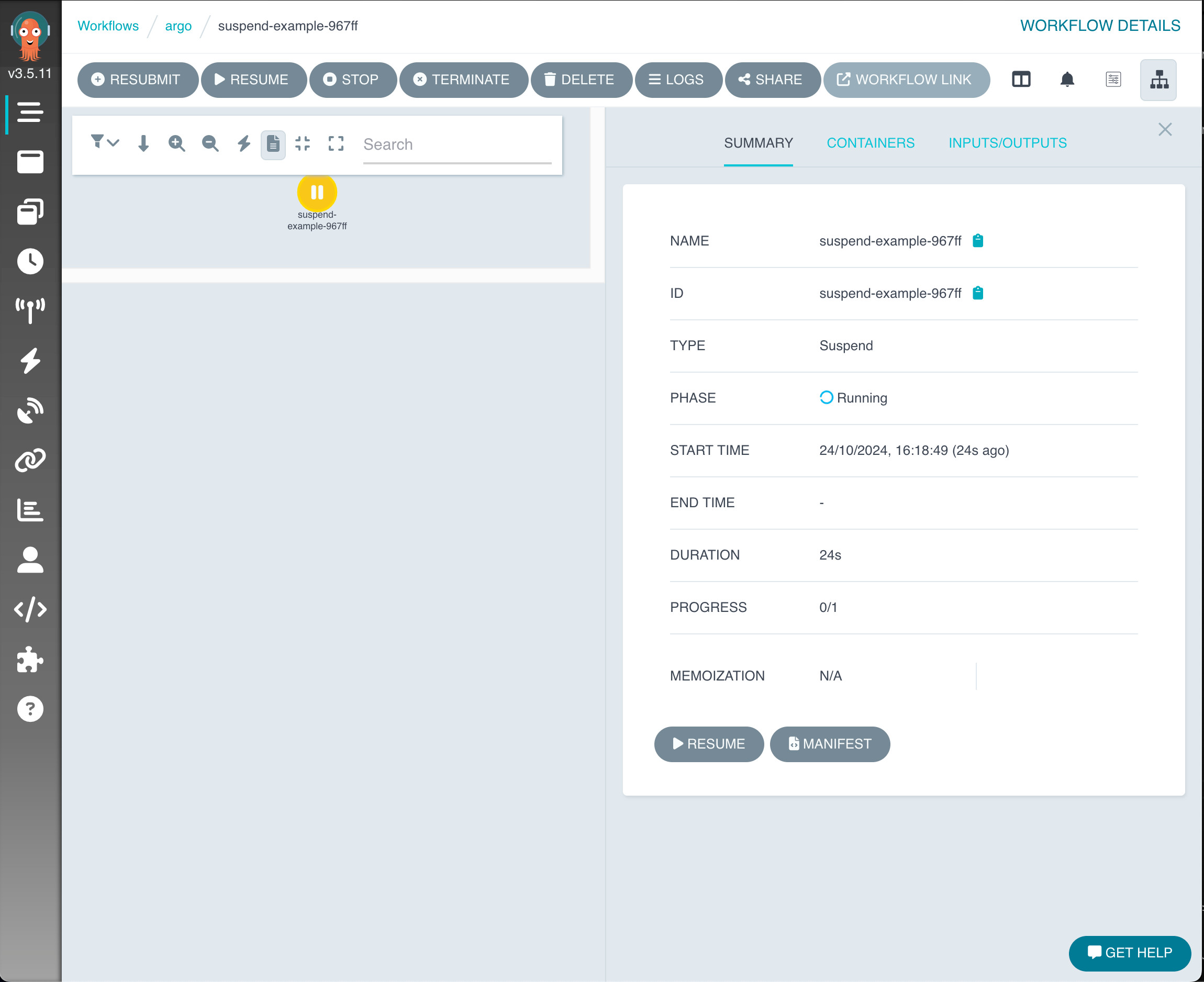
To resume a workflow using the UI, you can click on the Resume button in the Workflow Details:
Resuming a suspended workflow with kubectl
We can also resume a workflow using kubectl, but it's a bit more complex. We just need to patch the workflow to mark the suspended node as successful (as you can see in the argo code). It might take a few seconds for the workflow to be marked as Succeeded:
$ kubectl patch workflow suspend-example-967ff --type='merge' -p '{"status": {"nodes": {"suspend-example-967ff": {"phase": "Succeeded"}}}}' workflow.argoproj.io/suspend-example-967ff patched $ kubectl get workflow -w NAME STATUS AGE MESSAGE suspend-example-967ff Running 5m24s suspend-example-967ff Succeeded 5m29s Posted on 31/10/2024