Argo Workflows: Passing artifacts in a multi-step WorkflowTemplate

3 min read | by Jordi Prats
In a Workflow we'll need to be able to share data between the different steps. To do so we can use the artifacts section in the WorkflowTemplate. This allows us to pass data between steps in a Workflow.
To show how to do this, we are going to use one step to clone a git repository with a private key, and then pass the cloned repository to a second step that will build and push the container image to a registry.
First we'll have to create the secret containing the SSH key that we are going to use to authenticate:
kubectl create secret generic github-creds --from-file=sshkey=$HOME/.ssh/id_rsa --from-file=known_hosts=$HOME/.ssh/known_hosts We are going to use this secret to be able to clone the repository. Once cloned, we are going to use the generated artifact to build and push the container image.
apiVersion: argoproj.io/v1alpha1 kind: WorkflowTemplate metadata: name: build-and-push-image-multistep spec: entrypoint: main volumes: - name: kaniko-secret secret: secretName: dockerhub-registry items: - key: .dockerconfigjson path: config.json - name: github-ssh-keys secret: secretName: github-creds items: - key: sshkey path: id_rsa - key: known_hosts path: known_hosts arguments: parameters: - name: git-repo-url - name: branch value: main - name: dockerfile value: Dockerfile - name: image-destination templates: - name: main steps: - - name: clone-repo template: clone-step - - name: kaniko-build template: kaniko-build arguments: artifacts: - name: repo from: "{{steps.clone-repo.outputs.artifacts.repo}}" - name: clone-step inputs: parameters: - name: git-repo-url value: "{{workflow.parameters.git-repo-url}}" - name: branch value: "{{workflow.parameters.branch}}" outputs: artifacts: - name: repo path: /workspace/repo container: image: alpine/git command: [sh, -c] args: - | set -x mkdir -p ~/.ssh && \ cp /mnt/ssh/id_rsa ~/.ssh/id_rsa && \ cp /mnt/ssh/known_hosts ~/.ssh/known_hosts && \ chmod 600 ~/.ssh/id_rsa && \ git clone --branch {{inputs.parameters.branch}} {{inputs.parameters.git-repo-url}} /workspace/repo volumeMounts: - name: github-ssh-keys mountPath: /mnt/ssh - name: kaniko-build inputs: parameters: - name: image-destination value: "{{workflow.parameters.image-destination}}" - name: dockerfile value: "{{workflow.parameters.dockerfile}}" artifacts: - name: repo path: /workspace/repo container: image: gcr.io/kaniko-project/executor:latest args: - --dockerfile={{inputs.parameters.dockerfile}} - --context=/workspace/repo - --destination={{inputs.parameters.image-destination}} volumeMounts: - name: kaniko-secret mountPath: "/kaniko/.docker" We can now create a Workflow that uses this template as follows:
apiVersion: argoproj.io/v1alpha1 kind: Workflow metadata: generateName: multistep-build-and-push-image- spec: workflowTemplateRef: name: build-and-push-image-multistep arguments: parameters: - name: git-repo-url value: "git@github.com:jordiprats/flask-pet2cattle.git" - name: branch value: "master" - name: image-destination value: "jordiprats/ampa:kaniko" And apply it as usual:
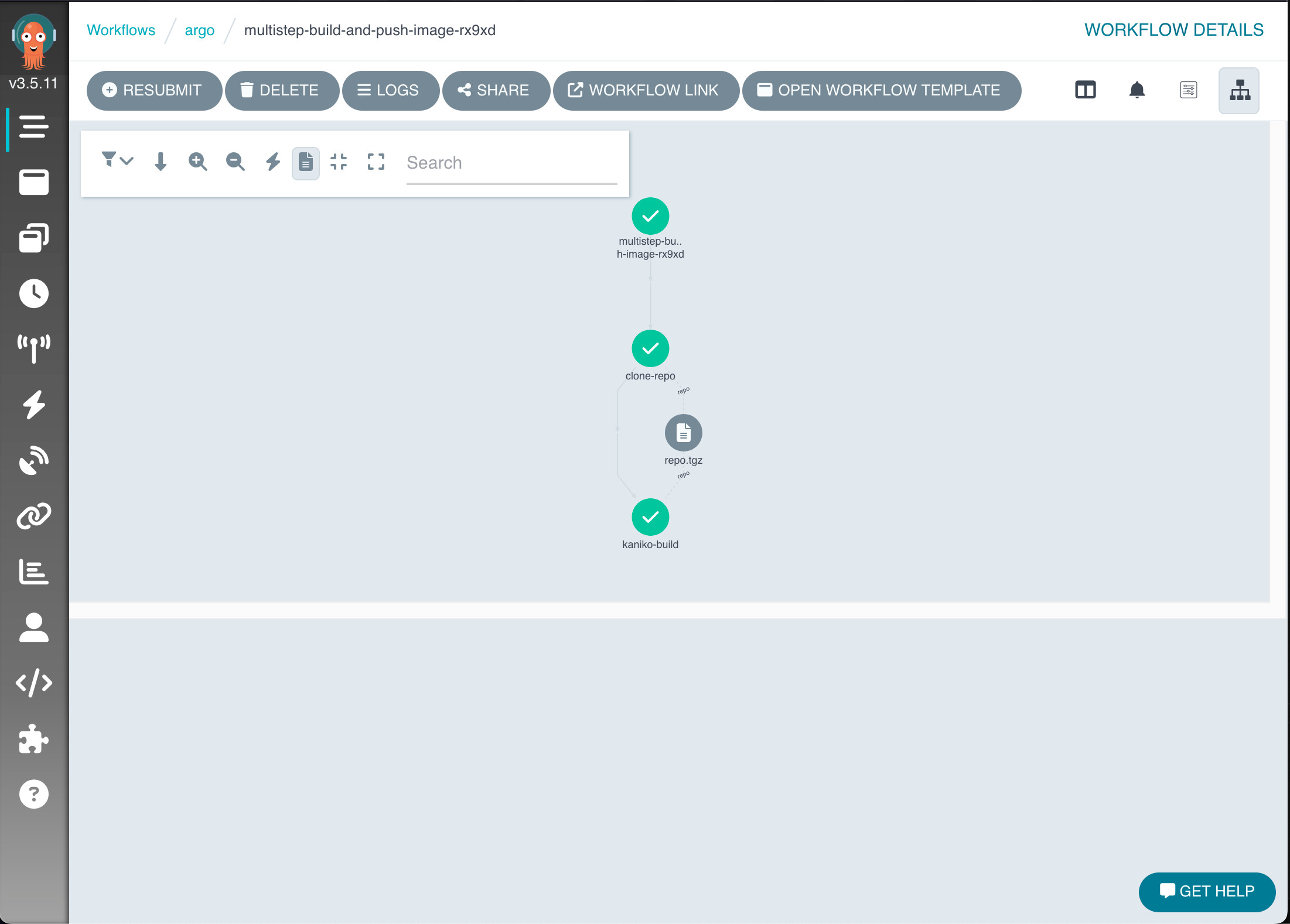
$ kubectl apply -f kaniko-template-multistep.yaml workflowtemplate.argoproj.io/build-and-push-image-multistep created $ kubectl create -f kaniko-template-multistep-instance.yaml ; kubectl get workflow -w workflow.argoproj.io/multistep-build-and-push-image-rx9xd created NAME STATUS AGE MESSAGE multistep-build-and-push-image-rx9xd Running 1s multistep-build-and-push-image-rx9xd Running 11s multistep-build-and-push-image-rx9xd Running 20s multistep-build-and-push-image-rx9xd Succeeded 56s If we use the UI, we'll be able to see how the artifact is passed along (and even download it):
Posted on 29/10/2024