-
kubectl: Retrieve a list of object names
2 min read

If we need to write some script to retrieve a certain information that kubectl can provide, we can always add the option to remove headers and use something like awk to narrowit down. There's also a better way than doing this:
kubectl get ns --no-headers | awk '{ print $1 }'31/08/2022
Read more... -
OpenShift CRC: Customize admin password
1 min read
When setting up a CRC cluster we might want to be able to set a specific admin password instead of having to retrieve it using crc console.
30/08/2022
Read more... -
AWS EC2/ASG: Set instance health as unhealthy using API an call
2 min read

If we are running an application on EC2 using an ASG that it's health check fails to properly notify it's status using an HTTP endpoint, if fixing it is not an option, we can create another custom HTTP endpoint to improve the existing, or if the situation cannot be fixed, we can set the instance heath as unhealthy from within the instance itself (or a lambda if needed)
29/08/2022
Read more... -
Set command arguments with environment variables
2 min read

When configuring command line arguments for containers we might need to be able to use certain values that might be elsewhere like the name of the current namespace.
We can use environment variables as the source of the information without having to write a wrappet to actually populate them
26/08/2022
Read more... -
Getting regular user and admin credentials to login to a CRC cluster
2 min read
If we are using CRC to run a minikube-like OpenShift cluster we'll need the use oc login to connect to the cluster. If we don't have the credentials but the cluster is not deleted, we can still retrieve them
25/08/2022
Read more... -
How to retrieve a github actions secret
2 min read
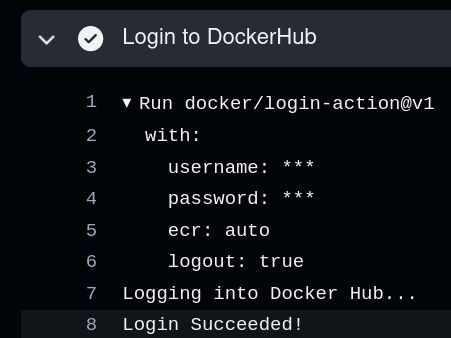
When using Github Actions secrets, it won't show any secrets on the action's logs: It is going to replace any string that matches with an existing secret with ***
24/08/2022
Read more... -
OpenShift: unable to start CRC
3 min read
While trying to setup CRC (a OpenShift version of minikube) on your laptop, while trying to start crc it might fail starting with the following crypting message:
$ crc start requires memory in MiB >= 921623/08/2022
Read more... -
Using ephemeral containers
3 min read

Starting Kubernetes 1.23, ephemeral containers are enabled by default (in beta though). Using ephemeral containers we can now troubleshoot pods by deploying a temporary container into it with extra privileges or binaries to use
22/08/2022
Read more... -
How docker generates container's names
2 min read

Everytime you create a container using docker, if not already set using --name, docker chooses a name for you: you can expect two words with a underscore:
$ docker run --rm -d alpine sleep 24h 38c4cc4e87762fc113ef174e9a4989e13d21037678abd3fe73840b825f14c7bf $ docker ps CONTAINER ID IMAGE COMMAND CREATED STATUS PORTS NAMES 38c4cc4e8776 alpine "sleep 24h" 5 seconds ago Up 3 seconds romantic_shternFor this example it was chosen romantic_shtern, but it can use a great variety of words:
$ docker ps --all | grep -v "Up" | awk '{ print $NF }' NAMES mystifying_poitras suspicious_shtern focused_chatelet keen_mendel happy_jackson xenodochial_margulis kind_blackburn gallant_pascal trusting_thompson (...)So, how does Docker generate names for it's containers?
01/08/2022
Read more...